
Download Roast My Room – AI‑Powered Interior Design & Staging Tool
Overview
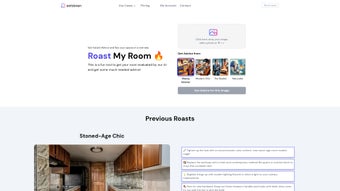
Roast My Room, created by the innovative team at SofaBrain, is an AI‑driven interior design app that turns the daunting task of home staging into a playful, insightful experience. By leveraging advanced machine‑learning algorithms, the app lets homeowners, real‑estate agents, and design enthusiasts instantly visualize, remodel, and “roast” any room—from cozy living rooms to bustling kitchens. The core of the platform is the uniquely named “Roast My Room” feature, where the AI delivers candid, style‑specific feedback and actionable suggestions.
Whether you’re after a classy Victorian vibe, a sleek modern chic look, a realtor‑ready showcase, or a nature‑inspired sanctuary, Roast My Room tailors its advice to match your chosen aesthetic. Users can experiment with monochrome palettes, contemporary material upgrades, innovative lighting solutions, and more, all within a secure, free‑to‑download environment that updates regularly with new design trends. The app’s intuitive interface, combined with its powerful visualizer, makes it a must‑have tool for anyone looking to boost curb appeal, improve personal living spaces, or simply explore creative interior concepts without hiring a professional designer.
Key Features that Set Roast My Room Apart
- AI‑Generated Room Roast: Receive instant, honest critiques from the AI, highlighting strengths and pinpointing design blind spots.
- Multiple Design Styles: Choose from Classy Interior, Modern Chic, The Realtor, and Naturalist presets for tailored recommendations.
- Real‑Time Visualizer: Drag‑and‑drop furniture, swap wall colors, and experiment with lighting to see changes instantly.
- Material & Finish Library: Access a vast catalog of contemporary materials, textures, and finishes that update weekly.
- Monochromatic Palette Generator: Let the AI propose sophisticated single‑color schemes that enhance space perception.
- Lighting Planner: Simulate modern fixtures, ambient lighting, and daylight effects to achieve the perfect mood.
- Export & Share Options: Export high‑resolution renders for client presentations, social media, or personal archives.
- Secure Cloud Sync: Keep your projects safe across devices with encrypted cloud storage.
- Free Core Version + Paid Pro Add‑Ons: Start for free, then upgrade for advanced AI insights, premium material packs, and priority support.
Beyond the listed functionalities, Roast My Room continuously learns from user feedback, meaning the AI’s recommendations become sharper and more personalized over time. The app also integrates with popular design tools like SketchUp and Photoshop, allowing professionals to import/export assets seamlessly. Its lightweight architecture ensures smooth performance on Windows, macOS, Android, and iOS devices, making it a versatile companion whether you’re designing on a desktop workstation or on‑the‑go with a tablet.
Installation & Usage Instructions
Getting started with Roast My Room is a breeze. Follow these steps to download, install, and begin redesigning your spaces:
- Download the Installer: Visit the official SofaBrain website or your platform’s app store (Microsoft Store, Apple App Store, Google Play). Click the “Download Free” button to obtain the latest version.
- Run the Installer: On Windows, double‑click the .exe file; on macOS, open the .dmg and drag the app to your Applications folder. Mobile users simply tap “Install”.
- Create an Account: Launch the app and register with an email address or social login. Account creation unlocks cloud sync and the AI roast feature.
- Select a Project: Choose “New Room” and either import a photo of your space or select a pre‑made floor plan from the template library.
- Pick a Design Style: From the style menu, select Classy Interior, Modern Chic, The Realtor, or Naturalist. The AI tailors its suggestions accordingly.
- Run “Roast My Room”: Click the roast button. Within seconds, the AI will generate a critique, highlight problematic zones, and suggest color palettes, furniture arrangements, and lighting options.
- Iterate: Apply suggested changes using the drag‑and‑drop editor. You can toggle between before‑and‑after views, save multiple versions, and export your favorite renders.
- Share & Collaborate: Use the built‑in sharing tools to send a link to clients, friends, or social media. Collaborators can leave comments directly on the project.
For best results, use high‑resolution photos with good lighting. The AI performs more accurate roasts when it can clearly see wall finishes, furniture outlines, and natural light sources. Regularly check the “Updates” tab to download new material packs and AI model improvements, ensuring your design recommendations stay current with industry trends.
Pros and Cons – A Balanced Look
Pros
- Free core version provides powerful AI feedback without hidden fees.
- Intuitive UI makes interior design accessible to beginners.
- Cross‑platform compatibility (Windows, macOS, Android, iOS).
- Rich library of materials, lighting fixtures, and color schemes.
- Secure cloud sync keeps projects safe and accessible.
- Exportable high‑resolution renders for professional presentations.
Cons
- Advanced AI insights require a paid Pro upgrade.
- Performance may dip on older smartphones with large 3D renders.
- Limited integration with some niche CAD software.
- Initial AI roast can be blunt; users may need time to interpret feedback.
- Material library updates are monthly, which may lag behind fast‑changing trends.
Overall, the benefits of Roast My Room outweigh the minor drawbacks, especially for users seeking a cost‑effective way to visualize and improve interior spaces. The free tier offers enough functionality to experiment, while the Pro version unlocks deeper AI analysis for serious designers and real‑estate professionals.
Review Summary: Roast My Room blends AI intelligence with user‑friendly design tools, delivering a fresh approach to home staging. Its “roast” feedback is candid yet constructive, making it a valuable companion for both amateurs and seasoned designers.
Conclusion and Frequently Asked Questions
Roast My Room stands out in the crowded interior‑design app market by marrying cutting‑edge AI with a playful, educational interface. Whether you’re a homeowner looking to freshen up a single room, a realtor aiming to boost property appeal, or a design hobbyist eager to experiment with trends, this tool provides instant, actionable insights that save time and money. The free version already packs a powerful visualizer and roast engine, while the optional Pro upgrade unlocks deeper analytics and exclusive material packs.
With secure cloud sync, cross‑platform support, and regular updates, Roast My Room is poised to become a staple in any modern design workflow. Ready to see what your space is really missing? Download Roast My Room now and let the AI give your rooms the makeover they deserve.
Frequently Asked Questions
Is Roast My Room completely free?
The core app, including the AI roast and basic visualizer, is free. Advanced features such as premium material packs, extended AI analysis, and priority support are available through a optional Pro subscription.
Which operating systems does the app support?
Roast My Room runs on Windows 10 or later, macOS 11 (Big Sur) or later, Android 7.0+, and iOS 13+. The app is optimized for both desktop and mobile experiences.
Can I import my own floor plans?
Yes. The app accepts JPEG, PNG, and PDF floor‑plan files. Once uploaded, you can trace walls, set room dimensions, and let the AI generate design suggestions based on your layout.
How does the AI generate its “roast” feedback?
The AI analyzes color harmony, spatial balance, lighting, and material usage against a database of professionally designed interiors. It then produces a concise critique highlighting strengths and offering specific improvement ideas tailored to the selected design style.
Is my data safe when I use cloud sync?
All user projects are encrypted both in transit and at rest using industry‑standard AES‑256 encryption. SofaBrain adheres to GDPR and CCPA guidelines, ensuring your design data remains private.



.png)



